In this blog, we are going to see how to generate output using eText Template in Fusion BI Publisher
I am going to show this using sample data. This is my sample data
Click "Export" button to download the XML file.


Add a format setup which is given below
<TEMPLATE TYPE>
|
FIXED_POSITION_BASED
|
<OUTPUT CHARACTER SET>
|
UTF-8
|
<NEW RECORD CHARACTER>
|
Carriage Return
|
Add a Header table which is given below. For headers, give the header name within quotes ex: 'Emplid'.
For headers, use the level DATA_DS which is the top level and appears only once in the XML
<LEVEL>
|
DATA_DS
|
|||||
<POSITION>
|
<LENGTH>
|
<FORMAT>
|
<PAD>
|
<DATA>
|
<COMMENTS>
|
|
<NEW RECORD>
|
DATA_DS
|
|||||
Alpha
|
‘Emplid’
|
|||||
Alpha
|
‘|’
|
|||||
Alpha
|
‘Employee
Name’
|
|||||
Alpha
|
‘|’
|
|||||
Alpha
|
‘Department’
|
|||||
Alpha
|
‘|’
|
|||||
Alpha
|
‘Position’
|
|||||
Alpha
|
‘|’
|
|||||
Alpha
|
‘Grade’
|
|||||
<END LEVEL>
|
DATA_DS
|
|||||
Add a Data table which is given below. For Data use the XML tags without quotes.
For Data, use the level G_1 which is repeating for each and every employee
<LEVEL>
|
G_1
|
|||||
<POSITION>
|
<LENGTH>
|
<FORMAT>
|
<PAD>
|
<DATA>
|
<COMMENTS>
|
|
<NEW RECORD>
|
G_1
|
|||||
Alpha
|
EMPLID
|
|||||
Alpha
|
‘|’
|
|||||
Alpha
|
NAME
|
|||||
Alpha
|
‘|’
|
|||||
Alpha
|
DEPARTMENT
|
|||||
Alpha
|
‘|’
|
|||||
Alpha
|
POSITION
|
|||||
Alpha
|
‘|’
|
|||||
Alpha
|
GRADE
|
|||||
<END LEVEL>
|
G_1
|
|||||
Save the template and upload it to the BI Report as eText Template as shown below

Open the report to see the output. This is my output.

To overcome this, use below
Alpha
|
./POSITION
|
Now save the Template, Upload it to the BI Report and save the report.
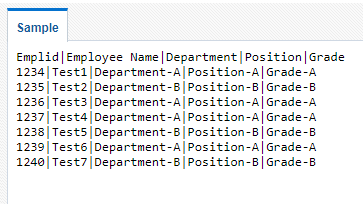
Open the Report to see the Output. This is the new output.
fusion bi eText Template output generation
ReplyDeleteGreat examples, thanks!
ReplyDeleteThanks for your feedback. If you have any questions or doubts, please let me know
Deletesuch a clean explaination...I was able to follow the above steps and created an eText Template. Thank You!!!!
ReplyDeleteThanks for your feedback. If you have any questions or doubts, please let me know
DeleteGreat Explanation.. what are the other types of carriage return we can use in E-text template?? Also explain how to create PDF report using E-text template??
ReplyDeleteThanks for your feedback. Please use RTF template to create PDF report output. Refer to blog https://e-learning-ever.blogspot.com/2019/03/fusion-bi-rtf-template-output.html
DeleteLet me know what are the pros & cons of E-text templates??
ReplyDeleteUsing E-Text template, you can create pipe or comma delimited text files seamlessly. You cannot create PDF or Excel files using E-Text template.
DeleteBut you can create a comma delimited text file and while doing FTP or e-mail you can rename it to CSV. The out put will be a CSV output.
Hi,
ReplyDeleteGreat Explanation. Additionally I have a question on the structure of eText Template. Can we transpose rows to columns in eText Template? I mean as of now this output is showing in Horizontal Way but can we design the template to show the same in vertical way? Please let me know.
Thanks in Advance
Thanks for your feedback. I am not sure about the transpose functionality in E-text templates. I will research and update you.
DeleteWhen should i use e text template and when should i use rtf template
ReplyDeleteeText templates are used to generate text output. RTF templates are used to generate PDF and Excel output.
DeleteOne trick is you can generate a comma separated text file using eText template and while transmitting the file through FTP or mail you can rename the file to csv.
Thank you for posting this. Do you know what needs to be added in order to incorporate looping of specific levels in the template?
ReplyDeleteThis comment has been removed by a blog administrator.
ReplyDeleteThis comment has been removed by a blog administrator.
ReplyDeleteThis comment has been removed by a blog administrator.
ReplyDeleteit is very simple and clear explanation Blogs should be like this to get a quick solutions
ReplyDeleteHi there,
ReplyDeleteIs it possible to print a column value with single quotes?eg 'Job Name'. I am able to do the same with double quotes. Please let me know if its possible.
Hi ,
ReplyDeleteI used above steps and created one E-Text template and loaded in report. But when i am running report i am not able to see any data. Can you please help me out why it is happening.
Thanks & Regards,
Ashish